The On-Call Expert
Build an AI Voice Agent That Handles Emergencies, Upsells, & Qualifies Leads For HVAC, Plumbing & Field Service
Why 97% of AI voice agents fail in real business—and how to build one that actually works.
Why 97% of AI Voice Agents Fail in Real Business
Most AI voice agents sound robotic because they're trained on generic scripts. The secret to creating an agent that sounds expert-level is feeding it deep, domain-specific knowledge.
Reframe the conversation from "AI answering calls" to "AI encapsulating your company's decades of expertise and safety protocols."
How to Generate the Industry Knowledge Base
The foundation of an expert-level AI voice agent starts with comprehensive, domain-specific knowledge.
Most AI voice agents sound robotic because they're trained on generic scripts. The secret to creating an agent that sounds expert-level is feeding it deep, domain-specific knowledge.
❌ Generic agent:
"I'll schedule someone to look at your AC."
✅ Expert agent:
"It sounds like your compressor might be short-cycling. That could indicate low refrigerant or a failing capacitor. I'm going to schedule a diagnostic appointment so our technician can check the refrigerant levels and electrical components. This prevents a complete system failure. Does tomorrow between 2-5 PM work for you?"
Create a comprehensive knowledge base for an AI voice agent or chatbot to become an expert in the HVAC industry, mastering every aspect of the field. NO emojis. Zero emojis. Include:

1. A structured outline with categories like services, FAQs, technical knowledge, pricing, local regulations, customer scenarios, and emergency protocols, all tailored to [NICHE].

2. Exhaustive content covering all relevant topics, including:
   * Industry-specific terminology and concepts (e.g., tools, techniques, materials).
   * Common and edge-case customer queries with detailed answers.
   * Step-by-step troubleshooting guides for typical and rare issues.
   * Pricing structures and upsell opportunities specific to the industry.
   * Local and regional regulations or standards impacting [NICHE].
   * Emergency procedures and best practices for urgent situations.
   * Strategies to ensure the AI is fully trained as a 'god-level' expert, including semantic search to handle varied query phrasing, knowledge graphs to connect related concepts, and continuous learning to address gaps based on user interactions.

Ensure the knowledge base is in-depth, covers every facet of the [NICHE] industry, overcomes the limitations of generic knowledge bases, and equips the AI to deliver precise, context-aware responses for any question or scenario in the field.
Simply replace "HVAC" with:
• Plumbing
• Electrical contractor
• Locksmith specialist
• Pest control professional
• Appliance repair technician
• Pool service expert
• Landscaping professional
The AI will generate a custom knowledge base for your industry.
After the AI generates your knowledge base, run this follow-up prompt:
This is excellent. Now please:

1. Add 10 more specific customer scenarios with exact phrasing customers might use
2. Include 5 examples of how to handle difficult/angry customers
3. Add troubleshooting questions for the 5 most common service calls
4. Provide exact scripts for transitioning to upsells without being pushy
5. Include safety disclaimers for DIY attempts

Make this even more comprehensive and realistic.
You also need information about the company that the agent is representing, like locations, services, prices, history, achievements, etc.
The easiest way to achieve this is to scrape the company's website and structure the information. You can use the following prompt in any LLM that is capable of accessing and crawling websites:
Crawl this entire website - https://example.com/ - and extract all the information that could be relevant and useful for an AI voice agent that will act as a receptionist/support agent for this company.
How to Generate the AI Voice Agent Prompt
Create a comprehensive prompt that defines your AI voice agent's identity, behavior, and capabilities
Write a detailed prompt for an AI voice receptionist representing a HVAC company.
The agent have a comprehensive knowledgebase all-about HVAC industry, that offers god-knowledge expert level about all aspects.
In its knowledgebase, it also has all the info related to that specific company, like locations, services, prices, history, etc.
The agent should successfully handle all kind of situations and enquiries, troubleshooting, etc.
The agent is able to schedule appointments and check calendar availability.

The prompt should be structured into:
#Identity & Purpose
#Voice & Persona
##Personality
##Speech Style

# Conversation Flow
## Introduction
## Appointment Type Determination
## Scheduling Process
## Confirmation and Wrap-up
## Response Guidelines
## END OF EVERY CALL

# Scenario Handling
## For Normal Scheduling
## For Urgent Appointment Requests
## For Rescheduling Requests
## HANDLING DIFFICULT CALLERS
## Handling potential hazard situations
## TRANSFER CONDITIONS (to human)

#KNOWLEDGE BASE REFERENCE

#BOOKING DETAILS TO COLLECT
GoHighLevel Setup
Follow these steps to set up your AI voice agent platform
Create an account on gohighlevel.com
Sign up for a GoHighLevel account and complete the initial setup process.
Setup the agent according to the instructions
Follow the detailed instructions from the video below to configure your AI voice agent.
Integration with n8N for Logging & Intelligence
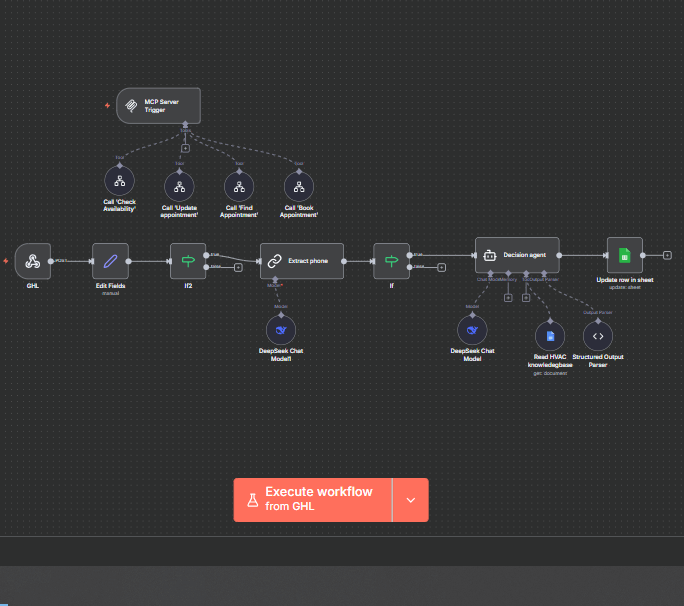
Connect your voice agent to n8N for advanced logging, analytics, and workflow automation
Create an account on n8n.com
Sign up for an n8N account (self-hosted or cloud) and complete the initial setup.
Follow the instructions from the video
Watch the video below for detailed step-by-step instructions on integrating n8N with your voice agent.
Setup Guidelines
Watch the complete walkthrough for setting up your AI voice agent
Do you need someone to implement a voice AI agent for your business? Let's discuss how we can help you build a system that handles emergencies, upsells, and qualifies leads automatically.
Ready to Build Your AI Voice Agent?
Get personalized guidance and implementation support for your voice automation journey