
The Scalable Monitoring Blueprint
The Exact 4-Step Framework to Automate Manual Research & Save 80+ Hours/Month
Transform your daily grind into a silent, automated asset. This guide shows you how to strategically select, build, and scale automation that actually delivers results.
Introduction & The "Time vs. Complexity" Matrix
You're not just saving time; you're reclaiming strategic capacity. This guide is your roadmap to turning a daily grind into a silent, automated asset.
Recently, I helped a client save 80 hours per month by automating their daily manual search for news across 50+ websites. But here's the critical question: Was that task worth automating?
The first step isn't building—it's strategic selection. Automate the wrong task, and you waste more time than you save.
Quick Wins
High Time, Low Complexity
The perfect starting point (e.g., the featured news monitoring task)
Action: Automate immediately using this guide
Strategic Projects
High Time, High Complexity
High ROI but requires planning (e.g., multi-source lead enrichment)
Action: Book a call to strategize
Ignore
Low Time, Low Complexity
Not worth the setup time
Action: Skip automation
Future Potential
Low Time, High Complexity
Monitor; complexity may drop with new tools
Action: Revisit later
Where does your task fall?
- 1.Where does your most repetitive task fall?
- 2.What one "Quick Win" could you tackle this week?
- 3.Does it feel like a "Strategic Project"? Let's talk
Tech Stack Breakdown
n8n (self-hosted or cloud) wins for data-heavy workflows due to its low-cost execution and superior control flow. Make is excellent for app-to-app integrations. Zapier is best for simplicity and wide app support.
For this type of automation, n8n's ability to handle complex data transformations and conditional logic makes it the ideal choice.
When to use a simple HTTP Request vs. a premium API like Scrape.do or Bright Data.
Decision Flow:
- Is the site static HTML? → Yes: Try HTTP Request first
- No/Blocked? → Use Premium API (Scrape.do or Bright Data)
Pro Tip: Scrape.do offers a free tier of 1000 credits per month that reset every month—perfect for testing and small-scale automation.
We used Gemini for its strong reasoning and JSON mode. Usually we are a big fan of how DeepSeek performs in various use cases, but in this specific use case it didn't perform that well. Choose your LLM based on the specific task requirements—JSON extraction, reasoning capabilities, and cost-effectiveness.
The "Scalability Checklist" Worksheet
Transform from a passive consumer to an active participant. This is the bridge between learning and doing.
Describe your manual task in one sentence:
List all data sources (websites, spreadsheets, apps):
What are the 3-5 rules a human uses to process this? (e.g., "Ignore items older than X," "Flag if it contains Y"):
What should the perfect final output be? (e.g., a sorted list in Sheets, a formatted email, a Slack alert):
Rate from 1-5 for each dimension:
Total Score: 0
Conclusion
Fill in the scoring fields above to calculate your total score. Score 12+ indicates a "Quick Win" or "Strategic Project."
See It In Action
Watch the complete demo of the news research automation system
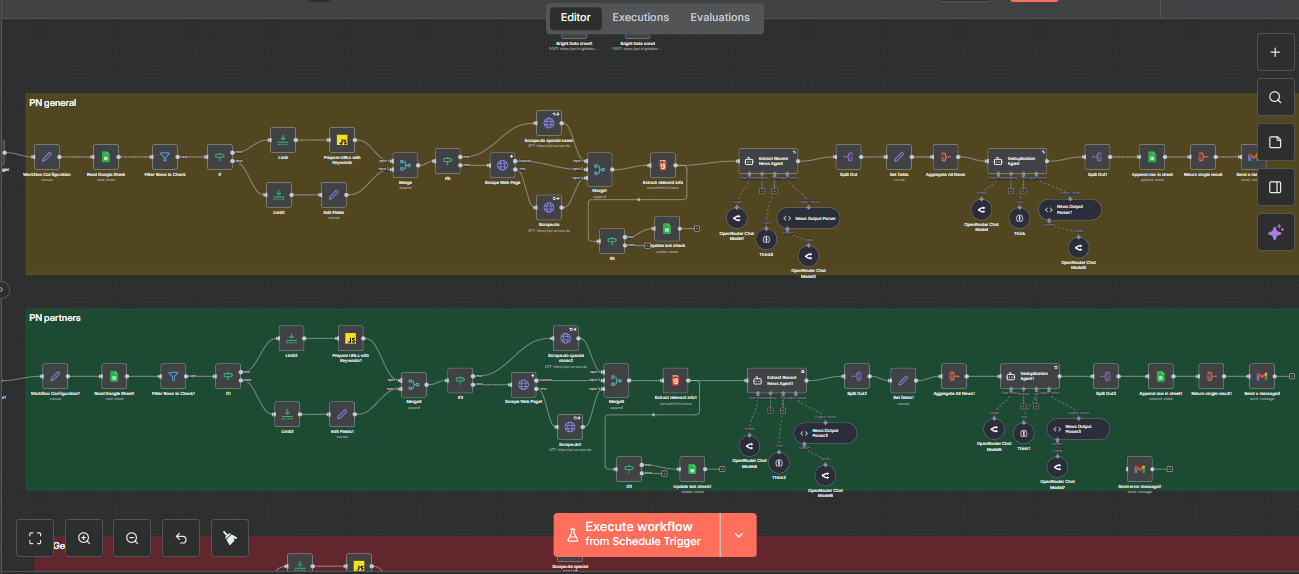
Deep Dive into the 4-Step Framework
This is the detailed "how-to" of your automation journey.
Create a Google Sheet with clear columns for Website Name, Base URL, Category, Keywords (comma-separated). This becomes your single source of truth that anyone on your team can update without touching code.
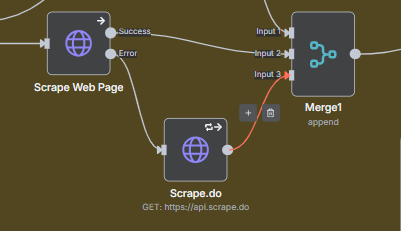
Start with a simple HTTP Request. If it fails (status code errors or empty responses), automatically fall back to a premium scraping API like Scrape.do. This ensures 99%+ reliability without overpaying for API calls.
AI Agent Prompt: You are a news extraction specialist. Your task is to analyze HTML content and extract recent news articles.

**CRITICAL INSTRUCTION:**
- Your output MUST ALWAYS be a valid JSON object with exactly this structure: {"news": [...]}
- When there are no news articles found, you MUST return EXACTLY: {"news": []}
- Never return just an empty array [] or empty string "" or null
- The response must always be a complete JSON object with the "news" key

**PROCESSING STEPS:**
1. Parse HTML content from search pages
2. Identify news articles published within the specified time threshold
3. Extract: title, URL, published date, and summary (if available)
4. Filter out articles older than the threshold
5. Return only articles in English and exclude other languages
6. For each article URL, if the extracted URL is relative, use the website domain from the given input to compose the absolute URL
7. If no recent news found or the HTML content is missing, return {"news": []}

**DATA FORMAT REQUIREMENTS:**
- Published date format: MM/DD/YYYY (e.g., 10/21/2025)
- All URLs must be complete and valid
- Titles and summaries must be in English only

**OUTPUT STRUCTURE - THIS IS NON-NEGOTIABLE:**
{
  "news": [
    {
      "title": "Example News Title",
      "url": "https://example.com/news/article",
      "publishedDate": "10/21/2025",
      "keyword": "keyword from input or empty string",
      "summary": "Example summary if available"
    }
  ]
}

EMPTY RESPONSE PROTOCOL:
- No articles found = Return: {"news": []}
- Invalid HTML = Return: {"news": []}
- All articles filtered out = Return: {"news": []}
- Any error condition = Return: {"news": []}

VALIDATION CHECK BEFORE RESPONDING:
1. Is the output a JSON object?
2. Does it have a "news" key?
3. Is the "news" value an array?
4. If no articles, is it exactly {"news": []}?

Remember: Your response must parse as valid JSON with the exact structure above, regardless of whether news articles are found or not.

**TOOLS:**
- Think: use this tool if you need in-depth thinking about your execution
Use Google's Gemini API (or your preferred LLM) with this exact prompt template. The AI will filter articles by date, extract key information, and match them to your keywords—all automatically.
Agent prompt: You are a deduplication specialist. Your task is to:
1. Analyze a list of news articles from multiple sources
2. Identify duplicates based on title similarity and content overlap
3. Keep only unique news items (remove duplicates)
4. Preserve the most complete version when duplicates are found
5. Return a clean JSON array of unique news articles
6. Maintain the original data structure
7. In case you don't receive any news as input, return EXACTLY the following JSON object: {"news":[]}

Consider articles as duplicates if they have:
- Very similar or identical titles
- Similar summaries or content
- Same event/story being reported

Be thorough but conservative - only remove clear duplicates.

#Output
Output a deduplicated JSON array with unique news items only, maintaining the structure:
[{
  "title": "article title",
  "url": "article URL",
  "publishedDate": "published date",
  "keyword": "keyword if available, otherwise empty string",
  "summary": "summary if available, otherwise empty string"
}]
Don't add any other details to the output.

#Tools
- Think: use this tool if you need in-depth thinking about your execution
After merging all article streams, use a deduplication step that compares URLs and titles. This ensures you only deliver unique, valuable content to your team.
Bonus: 3 Automation Pitfalls
Establish advanced authority and create the natural, logical bridge to your paid service. This shows you understand what can go wrong.
Automation is a system, not a spell. Sources change, websites update, APIs deprecate.
The Fix:
Build a simple "heartbeat monitor"—a weekly email confirming it ran and sample output. Schedule 15 minutes monthly for maintenance.
Teams start trusting flawed automated data blindly.
The Fix:
Implement a "human-in-the-loop" validation step for the first 2 weeks. Compare automation output with manual work. Calibrate until confidence is 95%+.
This is the biggest waste. You just do the wrong thing faster.
The Fix:
Use the Scalability Checklist before you build. Ask: "If we were starting from zero, is this the optimal process?"
Avoiding these pitfalls requires experience. If your Scalability Checklist revealed a "Strategic Project" or you simply want an expert to ensure your "Quick Win" is built reliably from day one...
Let's map out your first (or next) automation.
On a free 20-minute Automation Audit Call, we will:
- Review your completed checklist
- Whiteboard the optimal workflow architecture
- Identify the highest-ROI starting point
- Provide a clear project scope and roadmap
Limited spots available each week to ensure quality discussions.
Ready to Automate Your Manual Research?
Get personalized guidance and implementation support for your automation journey